Last updated June 2026

Midjourney to SVG

Fix Midjourney's raster-only limitation — turn PNG into a print-ready SVG

Vectorizing your logo…

Usually takes 10–15 seconds. Stay on the page.

Works with WebP (Adobe rejects WebP) Background removed automatically Editable color layers 10-second conversion

Your vector is ready

Compare them side by side. Notice the crisp paths and removed background.

Original (raster)
Vectorized (SVG)

Free download. Sign up free to convert more.

THE PROOF

Look What Happens When You Zoom In

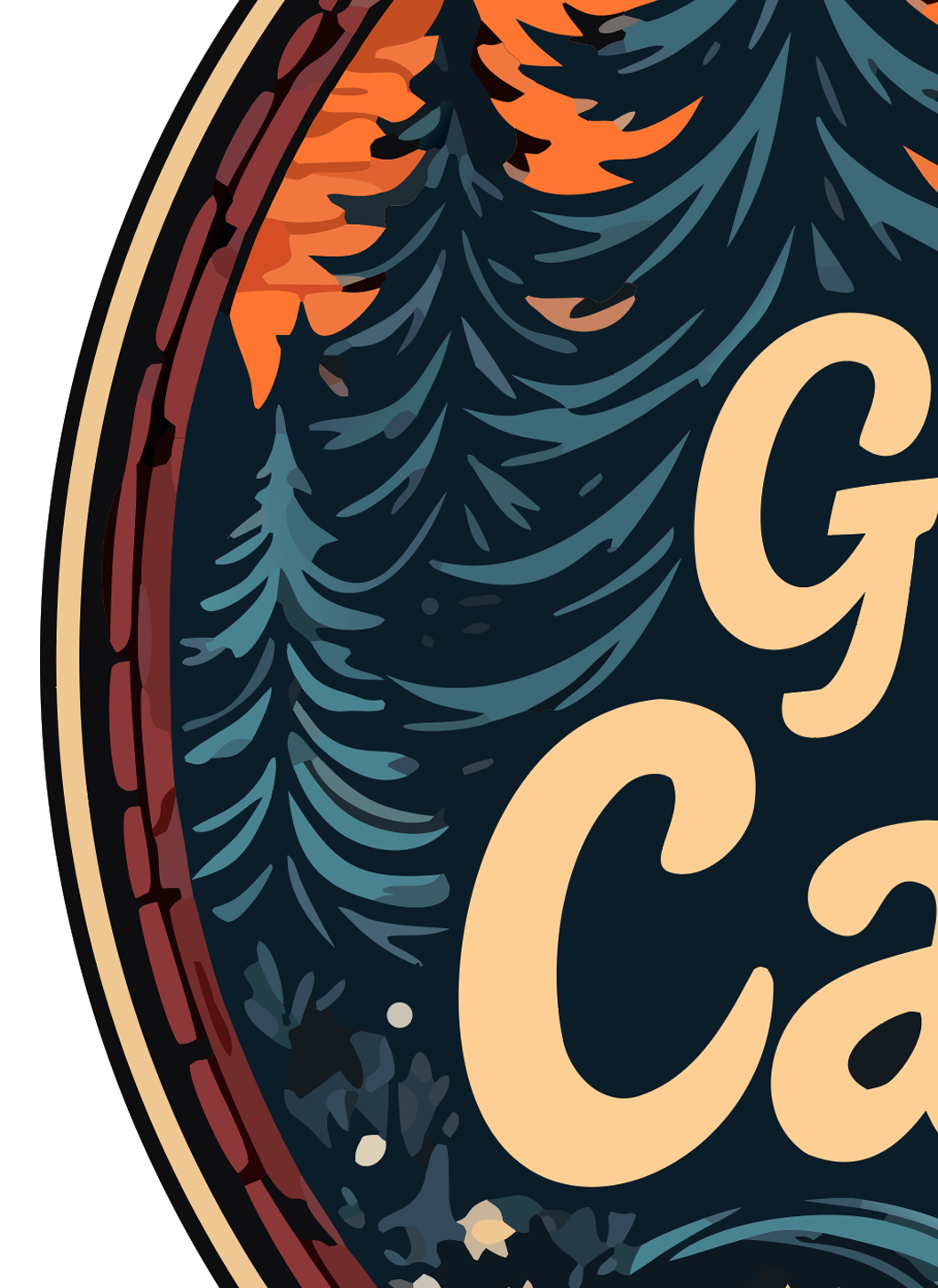
Both files started as the same logo. The left side is the raster PNG you started with. The right side is the vector SVG we generated. This is the difference between a clean print and a refund request.
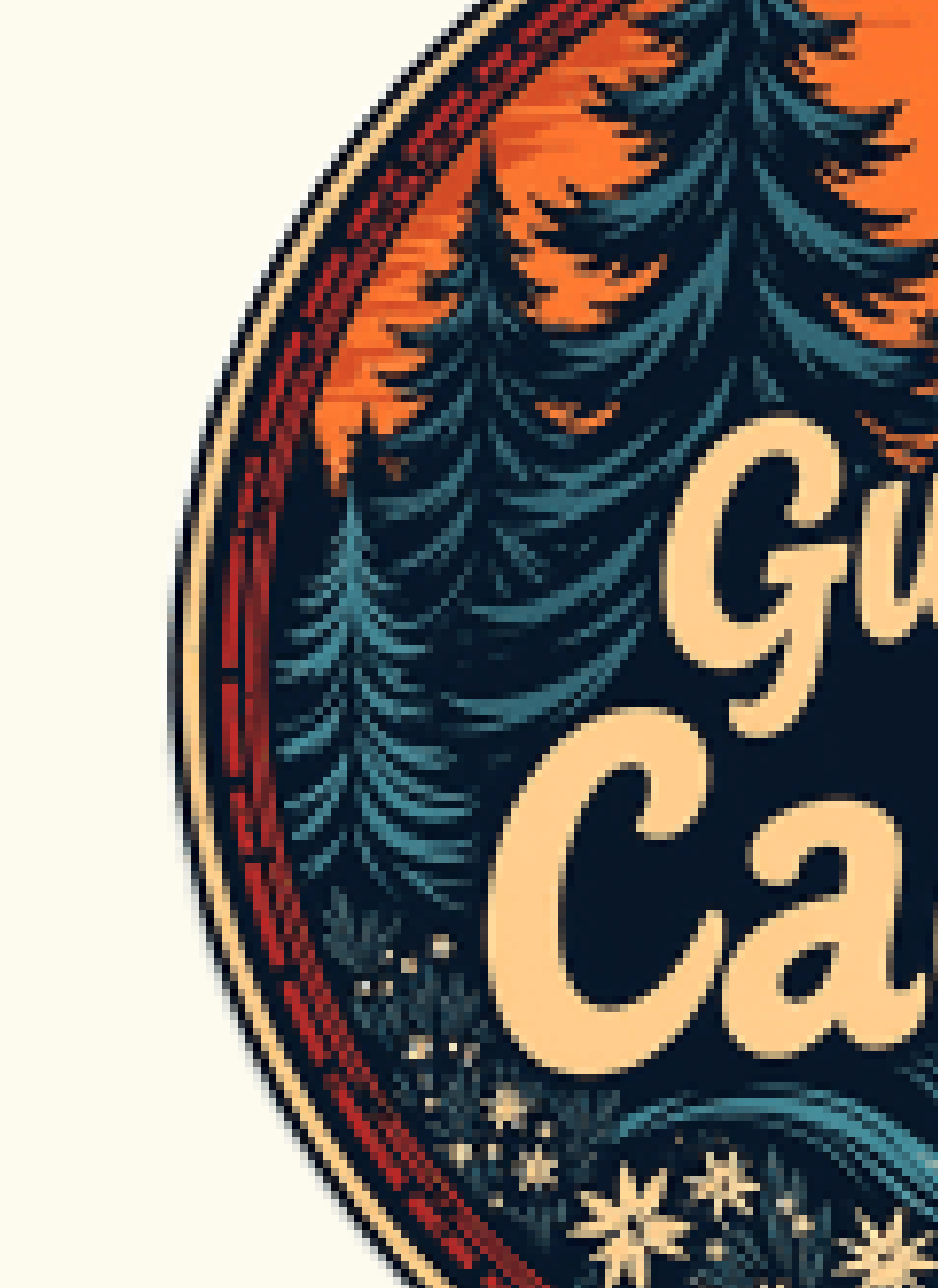
RASTER (PNG)
Original raster PNG logo zoomed in — pixelated and blurry
Pixelated and blurry — embarrassing on a sign or shirt.
VECTOR (SVG)
Vectorized SVG logo zoomed in — edges remain crisp and clean
Crisp at any size — print on a billboard, still sharp.

Real output, real zoom. Vector edges stay mathematical paths; raster edges turn into squares.

THE PROBLEM

Why Midjourney Only Outputs PNG (and What to Do About It)

Midjourney generates every image as a raster — usually PNG, sometimes WebP if you download from the web app. That's a pixel grid, not a vector. It looks great on screen but blurs the moment you scale it up for a shirt, sign, sticker, or Cricut cut. Midjourney has no native SVG export, no matter which model version (v6, Niji, etc).

The workaround people usually try — upscale to 4x in Midjourney, then vectorize — helps a little but stacks two lossy steps. And upscaling doesn't turn pixels into paths; it just adds more pixels. The vector conversion has to happen eventually if you want print-quality output at any size.

Drop your Midjourney PNG straight in. We hand you a multi-layer SVG — every color on its own editable path, background removed, no watermark. That's the file your print shop, Cricut, embroidery machine, or trademark filing actually needs. Free.

📱
What you have
PNG / WebP raster
Good on screen
Blurry when printed
🖨️
What you need
SVG vector
Sharp at any size
Print-ready everywhere
⚠️
What others give
Flat SVG (uneditable)
Single layer
Can't change colors
🎨
What we give
Multi-layer SVG
Every color editable
Background removed

WHY US

The Only Free Tool That Removes the Background and Keeps Every Color Editable

We tested every popular SVG converter with real AI-generated logos. Most either failed (Adobe rejects WebP) or output a flat, uneditable trace. Here's how we compare.

LogoMakr Adobe Express FreeConvert Vector Magic Picsvg
Pro-quality output (clean separated layers) Low quality Low quality Paid only Low quality
Accepts WebP (ChatGPT / Midjourney)
Background removed automatically
Editable color layers (80+) Flat Flat Paid only Flat
Free download (no watermark) Signup required Watermarked $9.95+
Conversion speed 10 sec 30+ sec 30+ sec 60+ sec 30+ sec
Edit on built-in design canvas

USE CASES

Built for Every Print Job You've Got

Once your logo is a true vector, it works on every printer, cutter, and embroidery machine — at any size. Here's what people use the result for:

👕
T-shirts & Apparel
Screen printing & DTG printers need vector to keep edges crisp at shirt size.
🪧
Signs & Banners
Storefront signs and trade-show banners scale up without pixelating.
💼
Business Cards
300+ DPI print needs vector logos to look professional, not blurry.
🧵
Embroidery
Stitch files require clean vector paths, not raster pixels.
✂️
Cricut & Silhouette
Cutting machines only read vector files. PNG won't work.
🔥
Laser Cutting
Laser cutters trace vector paths to engrave or cut.
🥤
Merch & Packaging
Mugs, stickers, boxes, labels — every printer wants SVG or PDF.
📑
Trademark Filing
USPTO accepts SVG and PDF vector formats for logo trademark applications.

HOW IT WORKS

From AI Image to Print-Ready Vector in 3 Steps

No design experience needed. No software to install. Drop, wait 10 seconds, download.

1

Drop your AI logo

PNG, JPG, or WebP — including the WebP exports Adobe rejects. Works with images from ChatGPT, Midjourney, Gemini, Adobe Firefly, or any source.

2

We vectorize in 10 seconds

Our AI traces every color into a separate editable layer, removes the background, and produces a true vector SVG you can scale to any size.

3

Download or edit

Download the SVG directly, or open it on our design canvas to recolor, add text, swap pieces, and save the final logo.

Common Questions

Does this work with all Midjourney versions (v6, Niji, v5)?
Yes. Midjourney outputs PNG (or WebP) regardless of model version. Drop the file straight in — no re-export needed.
How do I download my Midjourney image before converting?
In Discord: right-click the image → Save Image. In the Midjourney web app: click the image → Download. Both give you PNG or WebP, both work in our converter.
Can I use my Midjourney-generated logo commercially?
Midjourney's Terms of Service grant commercial use rights on Standard, Pro, and Mega plans (as of 2026). Free-tier trials do NOT grant commercial rights. Check your plan status in Midjourney and confirm rights before commercial use. The SVG we output from your image is also yours to use under whatever rights you have to the source image.
Why doesn't Midjourney just output SVG directly?
Midjourney is a diffusion model — it generates images pixel by pixel, not as mathematical paths. Every diffusion model works this way (DALL-E, Stable Diffusion, Firefly). Vector generation requires a fundamentally different model architecture, which is why external conversion tools like ours are the standard workflow.
Should I upscale in Midjourney before converting to SVG?
Not necessarily. Our tracer works from the paths in the image, not the pixel count. Upscaling adds more pixels but not more detail. Convert the standard 1024×1024 or 2048×2048 output directly — the vector will scale infinitely from there.
Will Midjourney's watermark show up in my SVG?
Only if it was visible in the source PNG (some free-tier or trial outputs have a Midjourney watermark). You can use the Erase tool after conversion to remove it. Paid Midjourney plans don't watermark output.
Will the background of my Midjourney image be removed?
Yes. If your Midjourney logo is on a solid or near-solid background (white, black, colored), we detect and remove it during tracing so your vector has only the logo.
Can I edit the Midjourney logo after converting?
Yes. Every color ends up on its own editable path in the SVG. Click Edit on Canvas to change brand colors, swap fonts, or add text. Or download the SVG and edit in Illustrator, Inkscape, or Figma.
Is the free SVG download watermarked?
No. Our free conversion downloads without any watermark. (If the source Midjourney image had one, that's separate — see above.)
Can I use the SVG for trademark filing?
You can file. Whether the USPTO grants a trademark on an AI-generated logo depends on your logo's distinctiveness and use in commerce, the same rules that apply to any logo. Being AI-generated doesn't bar registration in the US as of 2026, but consult a trademark attorney for your specific case.

Ready to convert your Midjourney logo to a real vector?

Free to try. Drop your Midjourney PNG, get an editable, print-ready SVG in 10 seconds.

⬆ Convert Midjourney to SVG