Last updated September 2026

Remove the Background From Your Logo

Free logo background remover - get a clean transparent logo, and an editable vector with it

Vectorizing your logo…

Usually takes 10–15 seconds. Stay on the page.

Works with WebP (Adobe rejects WebP) Background removed automatically Editable color layers 10-second conversion

Step 1 of 2 · your logo is traced

It is a real vector now. Step 2 is making it work for print.

Original (raster)
Vectorized (SVG)
Get my professional files  →

Vector PDF and SVG for your printer, plus a transparent high-resolution PNG and JPEG for your website and social profiles. Everything, in one download.

Sign up free to convert more.

THE PROOF

Look What Happens on a Colored Background

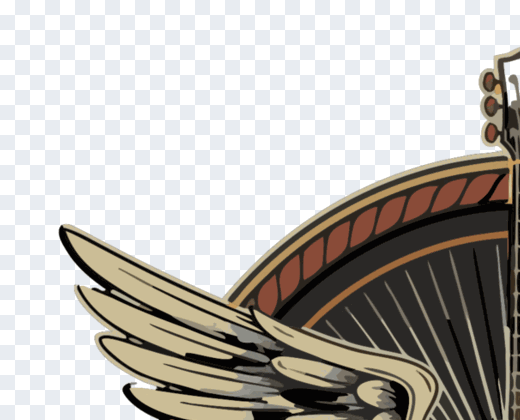
The same corner of the same logo. On the left, the background is baked into the file — a solid box that follows your logo everywhere. On the right, it is gone, and the artwork is now an editable vector. That box is what shows up on a colored header or a printed shirt.
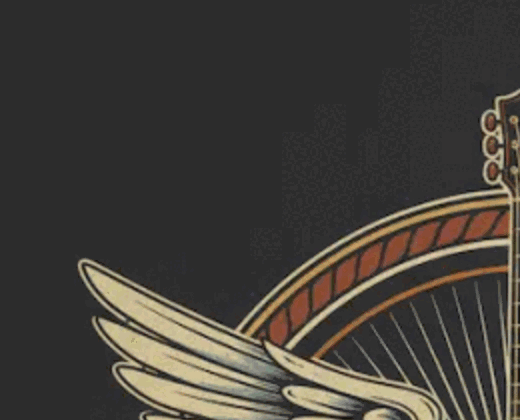
BACKGROUND BAKED IN
Logo corner before background removal — a solid dark background surrounds the artwork
A solid box travels with your logo onto every color.
BACKGROUND REMOVED
The same logo corner after background removal — genuinely transparent, shown over a checkerboard, with crisp vector edges
Genuinely transparent — drops onto any color cleanly.

Real output from this tool, both crops at the same scale. The chequerboard is how transparency is shown — it is not part of your file.

THE PROBLEM

Why a White Box Behind Your Logo Ruins It

ChatGPT, Midjourney, Gemini, and Adobe Firefly all export raster images — PNG or WebP files made of pixels. On a screen, they look perfect. But the moment you try to print one on a t-shirt, business card, or sign, the edges blur and the colors mush together.

Printers, embroidery machines, Cricut cutters, and screen printers can't use pixel images at scale. They need vector files — SVG, PDF, or AI — where every shape is a mathematical path that can be scaled to any size without losing quality.

Most converters online either don't accept WebP (Adobe Express), don't remove backgrounds (FreeConvert), or charge you to download (Vector Magic, Canva). We do all three. Free.

📱
What you have
PNG / WebP raster
Good on screen
Blurry when printed
🖨️
What you need
SVG vector
Sharp at any size
Print-ready everywhere
⚠️
What others give
Flat SVG (uneditable)
Single layer
Can't change colors
🎨
What we give
Multi-layer SVG
Every color editable
Background removed

WHY US

The Only Free Tool That Removes the Background AND Leaves Every Color Editable

We tested every popular SVG converter with real AI-generated logos. Most either failed (Adobe rejects WebP) or output a flat, uneditable trace. Here's how we compare.

LogoMakr Adobe Express FreeConvert Vector Magic Picsvg
Pro-quality output (clean separated layers) Low quality Low quality Paid only Low quality
Accepts WebP (ChatGPT / Midjourney)
Background removed automatically
Editable color layers (80+) Flat Flat Paid only Flat
Free sample to try ✓ SVG sample Signup required Watermarked $9.95+
Conversion speed 10 sec 30+ sec 30+ sec 60+ sec 30+ sec
Edit on built-in design canvas

USE CASES

Built for Every Print Job You've Got

Once your logo is a true vector, it works on every printer, cutter, and embroidery machine — at any size. Here's what people use the result for:

👕
T-shirts & Apparel
Screen printing & DTG printers need vector to keep edges crisp at shirt size.
🪧
Signs & Banners
Storefront signs and trade-show banners scale up without pixelating.
💼
Business Cards
300+ DPI print needs vector logos to look professional, not blurry.
🧵
Embroidery
Stitch files require clean vector paths, not raster pixels.
✂️
Cricut & Silhouette
Cutting machines only read vector files. PNG won't work.
🔥
Laser Cutting
Laser cutters trace vector paths to engrave or cut.
🥤
Merch & Packaging
Mugs, stickers, boxes, labels — every printer wants SVG or PDF.
📑
Trademark Filing
USPTO accepts SVG and PDF vector formats for logo trademark applications.

HOW IT WORKS

From Background to Transparent Logo in 3 Steps

No design experience needed. No software to install. Drop, wait 10 seconds, download.

1

Drop your AI logo

PNG, JPG, or WebP — including the WebP exports Adobe rejects. Works with images from ChatGPT, Midjourney, Gemini, Adobe Firefly, or any source.

2

We vectorize in 10 seconds

Our AI traces every color into a separate editable layer, removes the background, and produces a true vector SVG you can scale to any size.

3

Download or edit

Download the transparent PNG directly, or open it on our design canvas to recolor, add text, swap pieces, and save the final logo.

Common Questions

How do I remove the background from my logo?
Upload your logo as a PNG or JPG and the tool traces the artwork, separating it from whatever sits behind it. The background is dropped automatically, and you get a clean logo you can place on any color. No signup is needed to try it, and the first conversion is free.
Will the background be genuinely transparent, or just white?
Genuinely transparent. The background is removed rather than painted over, so there is no white box left behind. Drop the logo onto a dark website header, a colored flyer or a photograph and the space around it stays empty rather than showing a pale rectangle.
Why does my logo have a white box around it on my website?
Because a standard JPG cannot store transparency, and many PNGs are exported with a solid white layer behind the artwork. On a white page you never notice. The moment the logo sits on a color, that hidden rectangle appears. Removing the background fixes it permanently.
What files do I get back?
A transparent PNG for web, social and documents, plus an editable SVG vector of the same logo. The SVG keeps every shape as a separate path, so you can recolor or resize it later without any loss of quality. Print-ready PDF and high resolution PNG are included in the paid packs.
Does it work if my logo is on a photograph or a busy background?
It is built for logos, not photographs. A logo on a flat or simple background comes out cleanly. A logo sitting on a detailed photo, a gradient or heavy texture will not separate reliably, because the tool traces artwork shapes rather than cutting a subject out of a scene.
Can I still change the colors after the background is removed?
Yes. Because you also get a vector version, every shape stays editable. Open it in the LogoMakr canvas to change colors, swap fonts or adjust the layout, then download again. That is the difference between this and a tool that only flattens your file.
Will the transparent logo work for printing, embroidery and cutting?
Yes. The vector file is what print shops, embroiderers and cutting machines such as Cricut ask for, and a transparent background means no unwanted rectangle gets printed or stitched around your mark. Use the print-ready PDF for anything going to a commercial printer.
Is the free version watermarked?
No. What you download is your logo, with nothing added on top. The free conversion gives you the transparent result to check before deciding anything. Paid packs add the higher-resolution files, the print-ready PDF and the other formats a printer or supplier normally asks for.

Ready to print your AI logo at any size?

Free to try. No signup. Drop your logo, get a print-ready vector in 10 seconds.

⬆ Vectorize My Logo